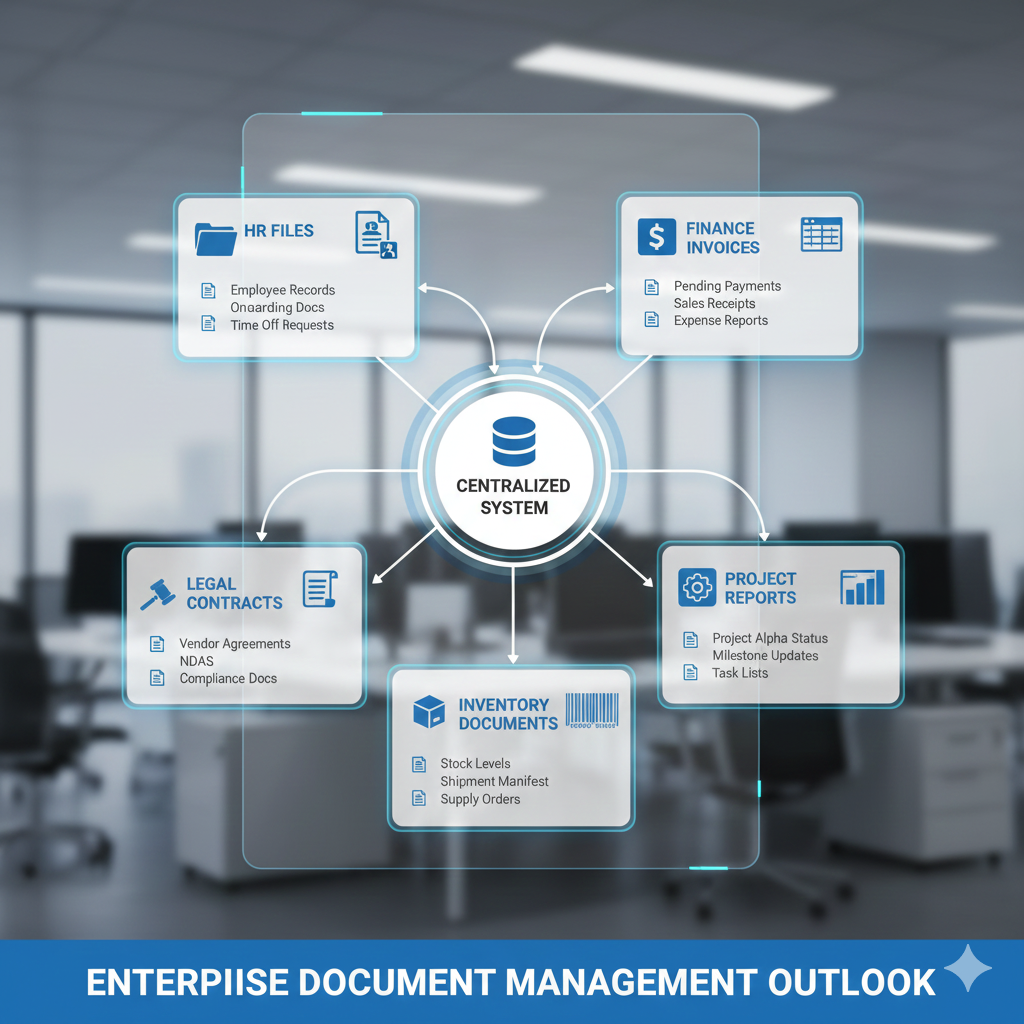
Your accounting team has spreadsheets. HR has employee files. Operations has purchase orders. Sales has contracts. And somehow, none of these people can find what they need when they need it.
Welcome to the document disaster zone.
Here’s the problem: most companies treat documents like they’re departmental property. Sales keeps their stuff in one place. Finance keeps theirs somewhere else. And when someone needs information that crosses departments? Good luck.
An ERP document management system changes this. It becomes the single source of truth for every document in your business—no matter which department created it.
Let’s break down what that actually looks like.
Finance and Accounting: Where Every Penny Has Paperwork
Your finance team lives and dies by documents. Missing one invoice or misplacing one receipt can throw off your books for weeks.
Documents an ERP handles:
- Invoices (accounts payable and receivable)
- Purchase orders and requisitions
- Expense reports with attached receipts
- Bank statements and reconciliation records
- Tax documents (W-9s, 1099s, W-2s, quarterly filings)
- Financial statements (balance sheets, P&L, cash flow)
- Budget reports and variance analyses
- Audit trails and compliance documentation
- Payment confirmations and wire transfer records
- Credit memos and adjustment forms
Why it matters: A manufacturer I worked with was manually matching invoices to purchase orders. Three people spent 20 hours per week on this. Their ERP automatically linked documents by PO number, vendor, and amount. Those 60 hours? Reduced to 5.
The system didn’t just store documents—it connected them. Click on an invoice, and you instantly see the related PO, receiving report, and payment confirmation.
Human Resources: People Data That Actually Stays Private
HR documents are sensitive. They’re also everywhere—offer letters in email, performance reviews in shared drives, I-9 forms in a filing cabinet.
An ERP centralizes everything with proper security.
Documents an ERP handles:
- Employment applications and resumes
- Offer letters and employment contracts
- Onboarding paperwork (I-9, W-4, direct deposit forms)
- Employee handbooks and policy acknowledgments
- Performance reviews and disciplinary records
- Training certificates and compliance documentation
- Time-off requests and approval records
- Benefits enrollment forms
- Payroll records and pay stubs
- Termination paperwork and exit interviews
- Background checks and reference letters
The security advantage: Role-based permissions mean only authorized people see sensitive documents. Your warehouse manager can view their own performance review but can’t access anyone else’s salary information.
Real scenario: A retail chain with 45 locations was storing employee files locally at each store. When corporate HR needed documentation, they’d call and wait for someone to scan and email it. Their ERP created employee profiles where all documents lived digitally. HR could access any employee’s file in seconds—from anywhere.
Operations and Supply Chain: Tracking the Physical World
Operations runs on documentation. Every shipment, every inspection, every quality check generates paperwork.
Lose a document, and you can’t prove compliance. Can’t track inventory. Can’t resolve disputes.
Documents an ERP handles:
- Purchase orders and change orders
- Vendor contracts and service agreements
- Receiving reports and packing slips
- Shipping manifests and bills of lading
- Inventory count sheets and cycle count records
- Quality inspection reports
- Equipment maintenance logs
- Safety data sheets (SDS)
- Compliance certificates and permits
- Warranty documents
- Return merchandise authorizations (RMAs)
Why integration matters: When a shipment arrives, the receiving team scans the packing slip. The ERP automatically matches it to the purchase order, updates inventory levels, and notifies AP that the invoice can be processed.
No phone calls. No emails. No “did that order arrive yet?”
Construction example: A commercial contractor was losing change orders in email threads. Arguments with clients about what was approved versus what wasn’t. Their ERP created an audit trail—every change order uploaded, timestamped, and linked to the project. Disputes dropped by 60%.
Sales and Customer Service: Documents That Build Relationships
Your sales team makes promises. Your service team keeps them. And both need access to the same information.
Documents an ERP handles:
- Quotes and proposals
- Sales contracts and master service agreements
- Customer purchase orders
- Delivery confirmations and proof of service
- Service tickets and work orders
- Customer correspondence (emails, meeting notes)
- Product specifications and technical drawings
- Warranty claims
- Payment history and credit applications
- Non-disclosure agreements (NDAs)
The connection: A customer calls about an order. Your service rep opens their account and sees everything—the original quote, signed contract, invoices, shipment tracking, and previous support tickets. They don’t transfer the call. They don’t put anyone on hold to “look that up.” They just help.
Franchise scenario: A food franchise with 30 locations was emailing daily sales reports to headquarters. Reports arrived late, got lost, or had the wrong format. Their ERP auto-generated reports from POS data and stored them centrally. Franchise owners could access their reports anytime. Corporate could compare performance across locations instantly.
Legal and Compliance: Documents That Keep You Out of Trouble
In regulated industries—healthcare, food service, manufacturing, accounting—documentation isn’t optional. It’s survival.
Documents an ERP handles:
- Contracts (customer, vendor, employee, lease)
- Insurance policies and certificates
- Permits and licenses
- Regulatory filings and inspection reports
- Safety training records
- Incident reports and accident documentation
- Environmental compliance records
- Industry certifications (ISO, OSHA, FDA, etc.)
- Legal correspondence
- Intellectual property documents
The compliance advantage: Automatic retention policies. The system keeps tax documents for seven years, then deletes them. Keeps OSHA records for five years. Keeps employee medical records for 30 years. You set the rules once—the system enforces them forever.
Healthcare example: A medical practice faced an insurance audit. They needed three years of patient billing records, procedure documentation, and authorization forms. With paper files, this would take weeks. Their ERP? They generated the complete audit package in 90 minutes.
Manufacturing and Quality Control: Documents That Prove Your Process
Manufacturing generates documentation at every step. If you can’t prove your process, you can’t guarantee your product.
Documents an ERP handles:
- Bills of materials (BOMs)
- Production schedules and work orders
- Quality control checklists
- Inspection reports and test results
- Equipment calibration records
- Standard operating procedures (SOPs)
- Non-conformance reports
- Supplier certifications and material certificates
- Batch records and traceability documents
- Engineering change orders (ECOs)
Traceability matters: A food manufacturer had a potential contamination issue. They needed to trace every ingredient in a specific batch back to the supplier. Their ERP linked batch records to supplier certificates to receiving reports. They identified the problem source in 2 hours instead of 2 weeks.
IT and Administration: Documents That Run the Business
Someone has to manage the systems, vendors, and infrastructure.
Documents an ERP handles:
- Software licenses and subscription agreements
- Vendor contracts and SLAs
- Network diagrams and system documentation
- User manuals and training guides
- Security policies and access logs
- Disaster recovery plans
- Hardware warranties and maintenance contracts
- Meeting minutes and board resolutions
- Corporate policies and procedures
The Real Power: Documents That Talk to Each Other
Here’s what makes an ERP different from dumping files in Google Drive.
Documents aren’t isolated. They’re connected.
Link an invoice to its purchase order. Link that PO to the contract. Link the contract to the vendor’s insurance certificate. Now you can see the complete story with one click.
Cross-department example: A customer disputes an invoice. Your AR team opens it and immediately sees:
- The original sales quote
- The signed contract
- The delivery confirmation
- Previous payment history
- Related service tickets
They resolve the issue in one call. No forwarding emails. No asking five people for information.
The Bottom Line
An ERP document management system doesn’t just store files. It creates a connected system where every document—from every department—lives in one place with the right security, searchability, and workflow automation.
Your accounting team stops asking operations for receiving reports. Your HR team stops emailing IT for new hire paperwork. Your sales team stops digging through email for signed contracts.
That’s not just convenient. That’s how modern businesses operate.
Ready to stop drowning in departmental document chaos? Intersoft ERP connects your documents across every department—so your team spends less time searching and more time working. See how it works.