
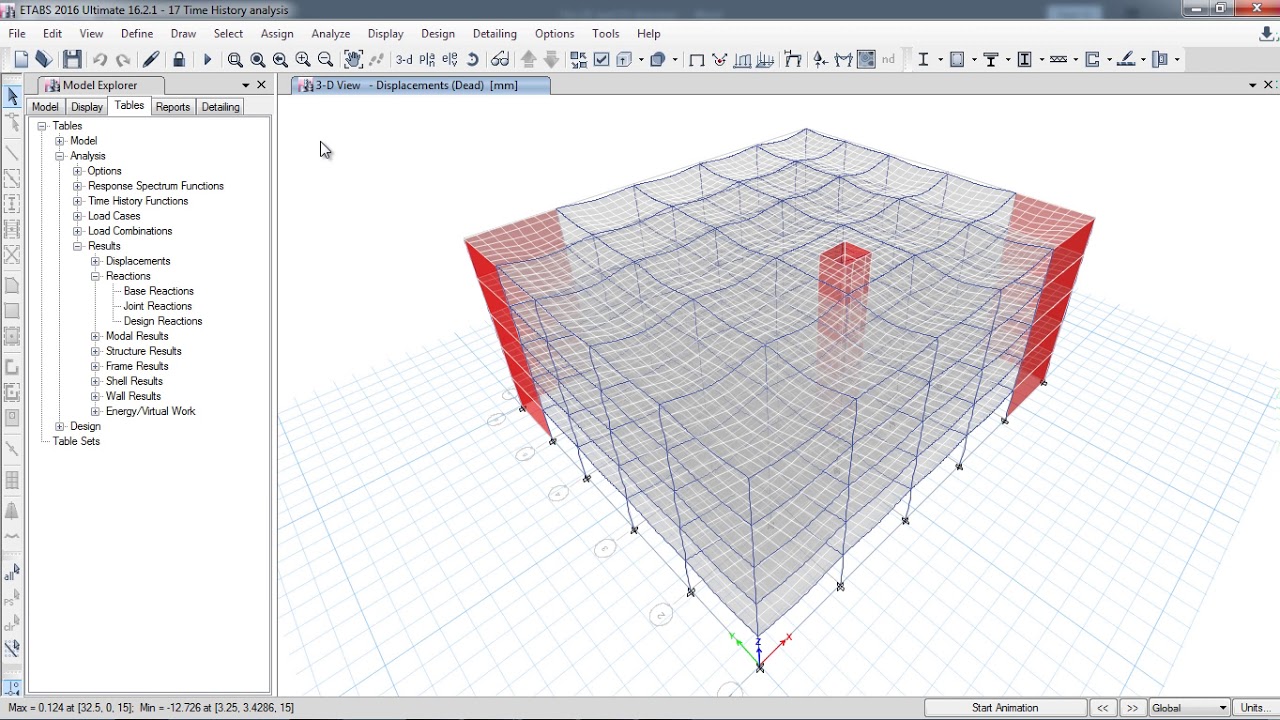
A building model can look complete on screen while hiding errors in its assumptions. Structural software helps engineers examine loads, member behavior, and stability before construction. For learners exploring Coursera ETABS, digital tools support engineering judgment; they do not replace it.
Strong modeling skills begin with structural fundamentals. Knowing how loads travel through slabs, beams, columns, and foundations makes software results easier to interpret and helps engineers make decisions they can explain.
Structural Fundamentals That Guide Digital Design Decisions
Before opening a modeling tool, engineers need to understand the structure being represented. These fundamentals give every input and result a practical meaning.
1. Understanding Loads And Their Effects
A structure carries dead loads, imposed loads, wind, and earthquake actions.
- Identify load sources: Consider occupancy, materials, equipment, and environmental conditions.
Correct load assumptions matter because inaccurate inputs can produce misleading results, even when software runs without errors.
2. Following The Load Path Through A Building
Loads move from floors into supporting beams, columns, walls, and foundations before reaching the ground.
- Trace the transfer: Check how each element supports and transfers forces.
Understanding this path helps engineers recognize discontinuities, weak connections, and unusual arrangements requiring attention.
3. Connecting Material Behavior With Design
Concrete, steel, and composite systems respond differently under stress. Their properties influence stiffness, strength, deformation, and detailing requirements.
- Know material parameters: Use appropriate grades and design properties.
Software processes values quickly, but engineers must confirm they represent intended materials and design standards.
4. Applying Codes And Engineering Judgment
Design codes establish requirements for loads, combinations, safety, and detailing. Engineers must identify the standards applicable to a project’s location and purpose.
- Check code provisions: Confirm the correct editions and requirements.
A model is only as dependable as its assumptions, so code knowledge must guide setup and review. A responsible engineer should review assumptions.
Practical Modeling Skills With ETABS In Civil Engineering
Digital modeling turns structural concepts into an analytical representation. Learning ETABS software used in civil engineering involves geometry, restraints, loads, analysis settings, and reported results.
1. Building An Accurate Structural Model
The model begins with grids, story levels, member dimensions, and material definitions. Input errors affect structural behavior.
- Set geometry carefully: Verify grids, elevations, and member connectivity.
A clear layout makes checks easier and reduces confusion during revisions.
2. Assigning Supports And Structural Properties
Boundary conditions and section properties influence how a structure responds. Incorrect restraints or member assignments can distort analytical behavior.
- Review assignments: Check supports, releases, sections, and material properties.
Engineers must confirm the model reflects the intended system rather than accept default settings without review.
3. Applying Loads And Running Analysis
After defining the model, engineers assign load cases and combinations before running analysis. The selected settings should reflect the design brief and applicable code.
- Validate load inputs: Review magnitudes, directions, and combinations.
A successful analysis does not confirm a safe design; outputs must be interpreted and checked.
4. Reading Results Beyond Colourful Diagrams
Displacement plots, force diagrams, and tables help identify how the model responds. Visual displays are useful, but numerical checks remain essential.
- Investigate unusual results: Review deflections, reactions, and member forces.
Compare results with expected behaviour and investigate irregularities before accepting the model.
Verification and Documentation For Strong Structural Design
A professional workflow combines software output with independent checks, calculations, and records. This converts an analytical model into a defensible design.
1. Performing Manual Checks Alongside Software Analysis
Hand calculations provide a useful comparison for selected members, reactions, and load effects.
- Cross-check key values: Verify representative calculations independently.
Manual checks can reveal modelling mistakes hidden in output reports.
2. Reviewing Member Design And Detailing
Design does not end with passing analysis results. Reinforcement, connections, dimensions, and constructability must also be considered.
- Check detailing requirements: Review reinforcement and member provisions.
A design must be practical to build and comply with relevant standards.
3. Managing Revisions And Model Quality
Changes to architectural layouts, material specifications, or loading can affect structural performance.
- Track each revision: Record changed inputs and review affected elements.
Version control helps prevent outdated assumptions entering final documentation.
4. Preparing Clear Drawings And Design Records
Reports and drawings communicate design intent to reviewers, contractors, and other project participants.
- Document decisions: Record assumptions, checks, and design outputs.
Clear documentation makes work easier to review, coordinate, and maintain.
Building Professional Skills Through Civil Online Courses
Software proficiency develops through practice and feedback. Structured learning connects theory with realistic design tasks.
1. Choosing Courses With Practical Project Work
A useful course should move beyond button-by-button demonstrations and explain the engineering decisions behind each step.
- Look for projects: Prefer exercises based on complete structural workflows.
Project practice connects modelling, analysis, design, and documentation.
2. Learning From Experienced Structural Mentors
Mentor feedback can help learners identify errors in assumptions, modelling methods, and result interpretation.
- Ask for clarification: Discuss difficult concepts and project decisions.
Guidance helps when software results appear unexpected or conflict with manual calculations.
3. Combining Software Skills With Core Concepts
ETABS is one part of a wider structural design toolkit. Knowledge of foundations, detailing, drafting, and other analysis platforms can broaden professional capability.
- Build connected skills: Study design principles alongside software applications.
A broader foundation helps engineers choose tools for different project requirements.
4. Creating A Portfolio Of Demonstrable Work
Completed projects, calculation notes, and drawings can help learners demonstrate their understanding during interviews or professional discussions.
- Keep work organized: Save models, assumptions, and supporting documents.
A portfolio shows software familiarity and the reasoning behind engineering decisions.
Conclusion: Building Skills Through Guided Structural Learning
Structural tools are most valuable when engineers understand the principles behind the numbers. Accurate modeling, code awareness, independent verification, and clear documentation turn software operation into responsible design practice. Learners who combine technical fundamentals with practical exercises can approach increasingly complex projects with stronger judgment and confidence.
For learners who want to turn technical knowledge into practical structural engineering skills, choosing the right training provider is an important first step. A structured learning approach through civil online courses can connect engineering concepts with practical modeling, analysis, and design applications. CivilEra offers training in ETABS, STAAD Pro, Revit, AutoCAD, foundation design, and structural detailing. They provide flexible options, including self-paced study, live instruction, mentoring, project practice, and doubt-clearing support. Their programs connect engineering fundamentals with consulting workflows, helping learners develop analysis, design, modeling, and documentation skills.