Data keeps growing every day. Companies, schools, and homes create more files than ever before.
IDC predicts that global data volumes will grow to an astonishing 221 zettabytes by 2026—that is, 221,000,000,000,000,000,000 bytes.
Experts expect this number to grow fast in the next few years. This growth makes storage systems very important. People need fast and simple ways to store and share files. Direct attached storage has become a popular choice for this task.
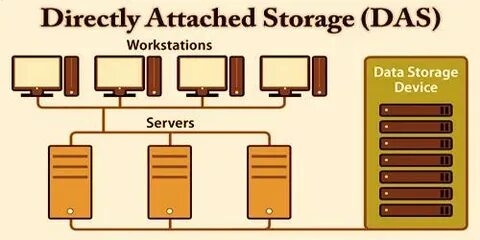
Direct attached storage connects storage drives directly to one computer or server. Many people think only one user can access it. The truth is different. Smart setup and modern software allow many users to use the same system. Teams can open files, share data, and work together smoothly.
This article explains how multiple users can work with DAS storage.
1. A Central Server Shares Files with Everyone
Many organisations connect direct attached storage devices to a powerful central server to manage large volumes of data efficiently. The server acts like a manager. It stores all the files and shares them with different users on the network.
Employees can connect to the server using their computers. They can read the files, edit the documents, and save the data. The server organises everything. This setup works well for offices and schools because the storage remains fast and reliable.
Key benefits of this method
- One server controls all data access.
- Users can open shared folders easily.
- Teams can work on the same projects.
- Data stays safe in one place.
How the Server Controls User Access
The server also controls permissions. Each user receives specific access rights. Some users can only read files. Others can edit or upload new data.
System administrators manage these permissions from a control panel. This keeps important files safe while still allowing teamwork. Because DAS storage connects directly to the server, the speed stays very high. Users experience quick file loading and smooth transfers.
2. Virtual Machines Allow Multiple Work Environments
Virtual machines create several digital computers inside one physical server. Each virtual system can run its own operating system and applications.
When DAS connects to the server, these virtual machines can access the same storage pool. This allows multiple users to work at the same time. Businesses often use this setup in development labs, research centres, and testing environments.
Reasons companies use virtual machines
- Multiple teams use the same storage.
- Each team works in its own environment.
- System resources stay organised.
- Storage performance stays strong.
Why Virtual Machines Work Well with Direct Storage
Virtual machines divide computing resources efficiently. Each machine receives part of the processor memory and storage. Because DAS connects directly to the main server, the system delivers very fast read and write speeds. This performance helps developers run tests, move files, and manage data without delay.
3. Shared Network Drives Expand Access
Organisations often convert direct attached storage into shared network drives. The storage connects to a host computer. The computer then shares folders across the network. Workers can open the shared drive from their desktops. They see folders just like local storage. This approach allows many people to access files at the same time.
Common uses of shared drives
- Team project folders
- Shared office documents
- Media libraries
- Backup storage
Shared drives make collaboration simple. People open files, update content, and save work instantly. When the host system uses DAS storage, the transfer speed remains high. Users don’t have to wait as long for large files to move quickly.
4. Storage Management Software Improves Collaboration
Modern storage management software adds another layer of control. This software manages how users access files and folders. Administrators create user accounts and define storage rules. The system tracks who opens files and who edits them. This improves teamwork and protects important data.
Features of storage management tools
- User authentication
- File activity tracking
- Storage quotas
- Backup automation
Software platforms also make DAS easier to manage. Administrators can monitor storage health and usage from one dashboard. Because the system runs directly on the connected computer, the performance remains strong even when several users access the data.
5. High-Speed Interfaces Support Heavy Workloads
DAS uses very fast connection technologies. These include USB 3.2, Thunderbolt, and SAS connections. These high-speed interfaces move data quickly between the computer and storage drives. When multiple users access files through the host system, the strong connection keeps the workflow smooth.
Advantages of fast interfaces
- Quick file transfer speeds.
- Reduced waiting time.
- Better performance for large files.
- Smooth teamwork for creative tasks.
Many creative teams rely on this design. Video editors, graphic designers, and engineers often work with very large files.
With DAS storage, the host computer reads and writes data quickly. The system can serve several users without slowing down the workflow.
6. Backup and Sync Tools Help Teams Share Data
Backup and synchronisation tools also help multiple users work with direct-attached storage. These tools copy files from the main system to other computers or cloud platforms. Team members can access updated files from different devices. Sync software updates files whenever someone makes a change. This keeps every user working with the latest version.
Benefits of backup and sync tools
- Teams access updated files quickly.
- Data remains safe during system failures.
- Remote workers can access shared data.
- File versions stay organised.
This approach expands the reach of DAS storage beyond a single machine. Teams in different locations can still collaborate smoothly.
Conclusion
Direct attached storage started as a simple storage method for single computers. Technology has changed the way people use it. Today, organisations can support many users with the right setup.
A central server can share files across teams. Virtual machines allow multiple working environments. Shared drives make file access easy for everyone. Storage management software controls permissions and activity. High-speed connections maintain strong performance even during heavy workloads.
The backup and sync tools make it easier to collaborate on the go. As the data increases, the need to store the data increases. DAS still remains a great solution to provide the necessary tools to collaborate while providing speed, simplicity, and performance.